Designing an AI agent that can't misquote the Bible
How the Sunday slides agent proves it never changed a verse, why Claude only gets to propose design changes, and how the design pass went from 50 cents to 8 cents a build.
In Part 1 I told the story: the same volunteers spent two hours or more every week building the Sunday slides, so I built an agent that does it on Thursday evening. This part is for the engineers: how it works, and how it earns enough trust to go in front of a congregation.
The shape of it
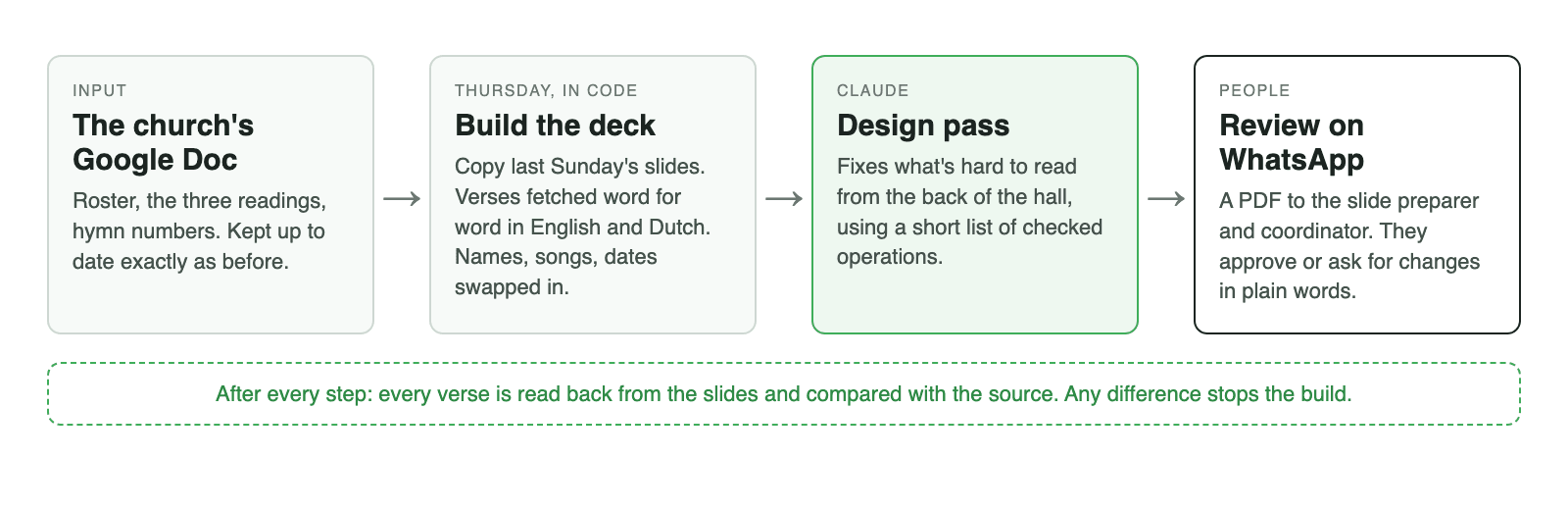
Four stages, and only one of them involves a model:
- Read the plan. Parse the church's Google Doc: the roster, three Bible references, hymn numbers, the activity of the week.
- Build the deck, in plain code. Copy last Sunday's deck, fetch every verse in English and Dutch, lay them out, swap in names, songs, dates, events and the roster table.
- Design pass (Claude). Fix anything that's hard to read from the back of the hall.
- People review, on WhatsApp, before anything goes on screen.
The most important design decision wasn't which model or which framework. It was where the model is not allowed. Everything below follows from that.
Rule 1: Scripture comes from a source, never from a model
Verse text is fetched from published translations and copied byte for byte. No model is ever asked to write, translate, shorten or tidy it.
The edge cases are where "just use AI" would be tempting, and where the agent deliberately doesn't guess:
- Half verses. Philippians 3:4b–14 starts halfway through verse 4. The agent includes the whole verse and flags it for the reviewer.
- Dutch Psalm numbering sometimes runs one verse ahead of the English, because the title counts as verse 1. The agent aligns the two and flags that too.
Rule 2: trust, but read it back
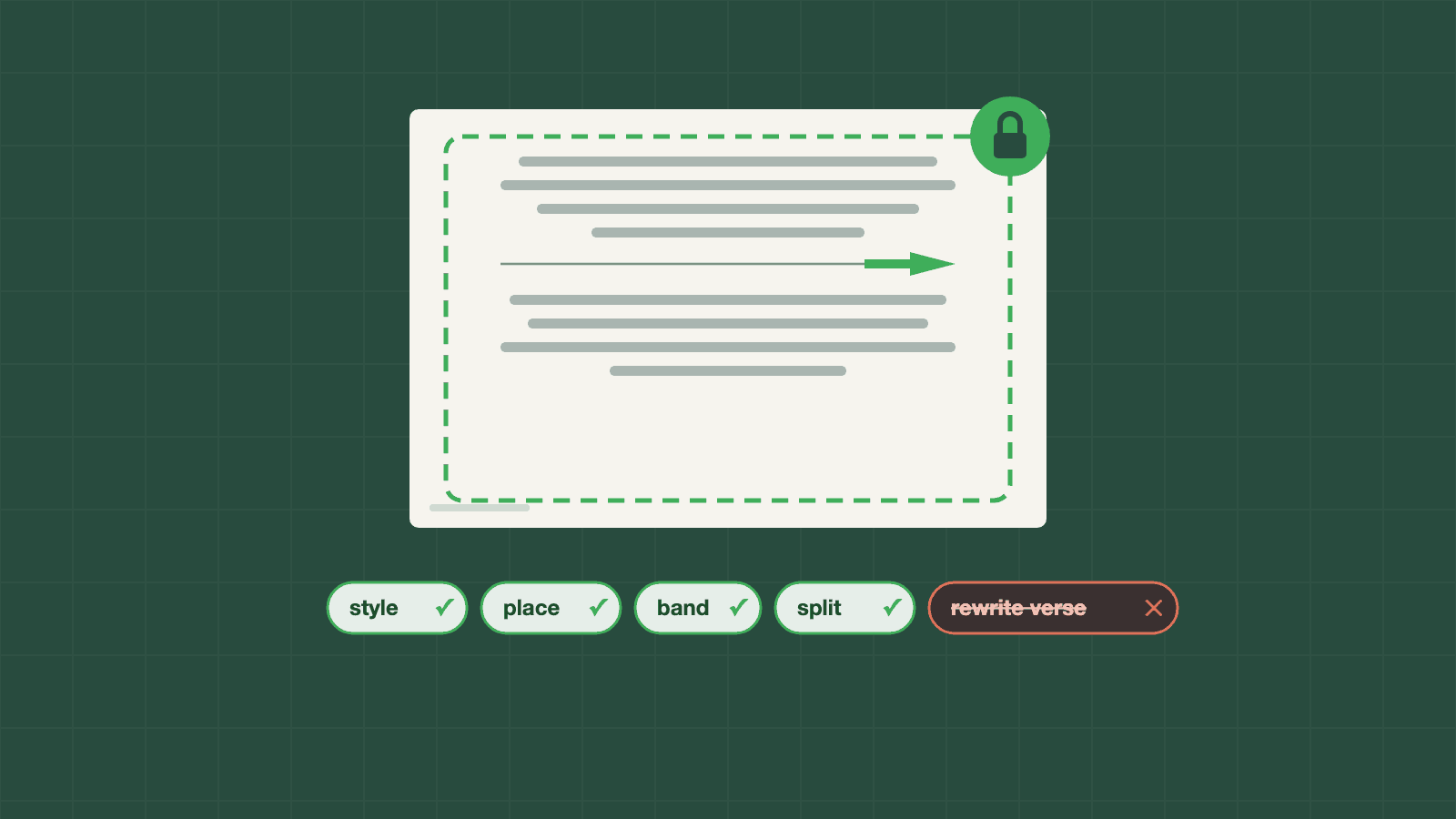
After the deck is built, and again after every design pass, the agent reads every verse back from the finished slides and compares it with the source. Any difference stops everything and nothing is published. Here's the end of the design pass:
after = scripture_texts(now, labels_of(now))
changed = [k for k, v in before.items() if k in after and after[k] != v]
if changed:  # can't happen with the allowed operations; checked anyway
    raise ScriptureChanged(f"Scripture text changed in {changed} — stop and check the deck")
My favourite line in the codebase is that comment. With the allowed operations, this can't happen. I check it anyway. A guard that "can't fire" costs nothing, and it's the only one that matters on the day it does.
Rule 3: the model proposes, the code decides
Claude never edits the slides directly. It looks at the deck the way a presentation designer would, then answers with a list of proposed changes in a fixed shape: restyle this box, move it, put a soft band behind text on a busy photo, split this long text over two slides. Each proposal must pass our checks before it touches the deck:
def check(op: Op, pres: dict, labels: list[Label], split_done=frozenset()) -> DesignOp | str:
    """The typed operation for a proposed change, or why it is refused."""
    if not 1 <= op.slide <= len(pres["slides"]):
        return "unknown slide"
    t = target(op, pres, labels, split_done)
    if op.op in NEEDS_ELEMENT and t.element is None:
        return "unknown element"
    if op.color is not None and (_hex_rgb(op.color) is None or loud(op.color)):
        return "colour missing, invalid or loud"
    return KINDS[op.op].parse(op, t)
The list of operations is the guardrail:
- There is no "rewrite this reading" operation. Small text fixes (typos, capitals, spacing) exist only for titles and announcements, never readings, references or names.
- A change that makes text run off the slide is undone automatically.
- Even colours are fenced:
loud()refuses neon. It's a church, not a nightclub.
The same idea runs through the WhatsApp side. Claude reads "swap the Epistle for Philippians 4" and turns it into one of a handful of actions (approve, change reading, remove slide, add slides, redesign, answer a question). The code carries the action out. If the request is unclear, it asks back with tap-to-answer buttons instead of guessing. It also refuses to remove the skeleton of the service, and new slides are accepted only as PowerPoint files.
Rule 4: boring operations
- Nothing is overwritten. If a deck for that Sunday already exists, the build stops.
- Idempotent runs. The Friday retry does nothing if Thursday succeeded.
- Slides are found by label, never by position. Labels live in the speaker notes, so a person can move slides around without confusing the agent.
- A watchdog (Cronitor) emails the coordinator when a build fails or doesn't run at all.
Sermon slides: a layout problem, solved in code
Preachers' slides are often dense. You could hand that to the model ("make this readable"), but splitting text is a deterministic problem, so it's done in plain code before Claude ever looks:
- a slide holds at most nine lines of body text, never below 28 pt;
- breaks fall between "blocks" (a numbered point, a paragraph, a bold sub-heading with its paragraph), never inside one;
- parts are balanced, so no slide ends up holding one lonely "Amen.";
- the heading repeats on every part with "(cont.)";
- every sermon slide gets one body size: the largest that doesn't need more than 30% more slides.
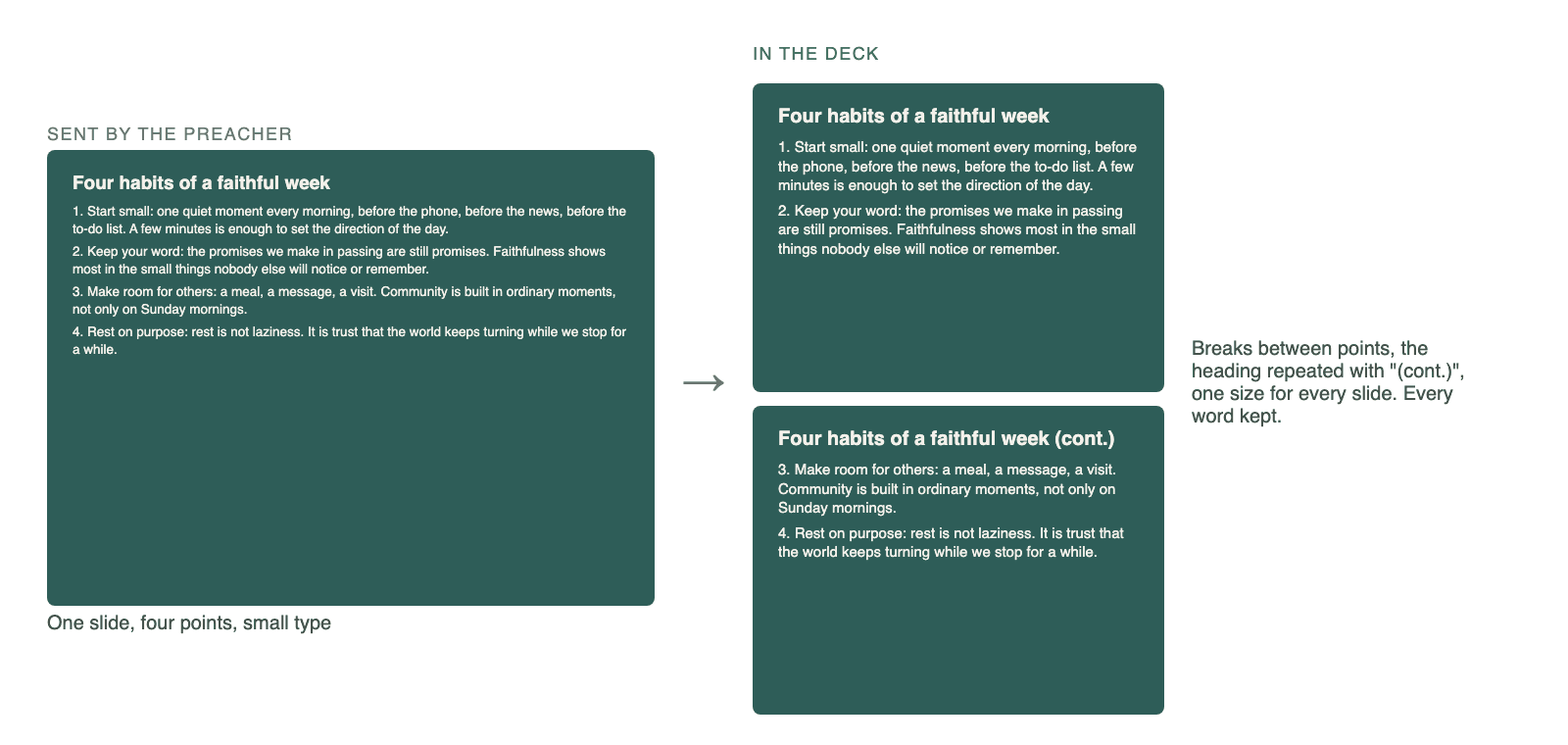
That leaves Claude the parts that need taste, like contrast and balance, and keeps the parts that need rules in code that's tested offline.
Songs: show your uncertainty
Hymns come from the best source available: the church's own PowerPoint folder, then 217 public-domain hymns, then word slides made from the scanned hymnal for the other 510. That last group was read by OCR, which makes mistakes. So those slides go into the deck hidden, and the review says so, until a person has proofread them.
A tool that says "I'm not sure about these three" earns more trust than one that is always confident.
What it costs (short version)
About $0.07 per weekly build and €3.40–4.40 a month in total. Getting the design pass from $0.50 to $0.08 a build took two decisions: Sonnet instead of Opus, and only designing the slides that changed since last week. The full breakdown, the monitoring and the night it failed are in Part 3.
What I'd tell another engineer
- Draw the line around the model first. Decide what it must never touch, then make that impossible in code and check it anyway.
- Let the model propose and the code apply. A small set of typed, validated operations is far easier to trust than "here's the deck, improve it".
- Use code for rules and the model for taste. Sermon paging is rules. Contrast is taste.
- Meet people where they are. Google Doc in, WhatsApp out. Nobody learned a new tool.
- Make uncertainty visible. Hidden hymn slides, flagged half verses, and a review page that says either Ready for review or exactly what to check.
Next, in Part 3: how it's run. Monitoring, latency, the Thursday it failed, and what every piece costs.